How to change a domain administrator and transfer the domain to another owner
We explain how changing a domain administrator differs from moving a website, moving a domain between accounts, or changing the registrar. Simply moving it inside the hosting account is not enough — the rights to the domain must be transferred through the registrar. If you need to reissue a domain to another person or organization, the procedure for Russian domain zones is handled through Webnames.ru.
- we explain the difference between a transfer and changing the administrator
- we help you understand which documents to prepare
- we help keep the website and email working
Administration rights
Change of administrator
Moving a domain to another hosting account does not mean changing the administrator in the registry.
For Russian domain zones, registrar rules and zone-specific restrictions matter.
The current and new administrators must be ready to verify their details.
Before transferring the domain, it is worth saving the NS, A, MX, TXT, and other records.
Main mistake
Moving a domain inside the hosting account is not enough
Sometimes a client does not simply need to move a website or display a domain in another account, but to transfer the domain to another owner: from a developer to a client, from an individual to a company, from an employee to the organization itself, or from one administrator to another.
In this case, it is important to follow the administrator change procedure. A domain administrator is not just a hosting panel user, but the person or organization whose details are recorded by the registrar and in the domain zone registry.
Website transfer
Website files, the database, SSL, email, and hosting settings are moved. The domain administrator may remain unchanged.
Moving between accounts
The domain may appear in another panel account, while the owner in the registry remains the same.
Registrar change
The registrar maintaining the domain records changes. This usually requires an AuthInfo code.
Administrator change
The person or organization the domain is registered to changes. This is what is needed when a domain must be transferred to another owner.
Terms
Are the domain owner and domain administrator the same thing?
In everyday language, people often say “domain owner”, “reissue a domain”, or “change the domain owner”. In the rules for Russian domain zones, the legally precise term is usually domain name administrator.
If the domain must be transferred to another person or organization, the domain administrator needs to be changed. Giving access to the website, hosting, or account does not by itself transfer domain rights.
Rights transfer
Domain rights transfer: when it is needed
A domain name rights transfer is needed when the person or organization the domain is registered to changes.
- a developer registered the domain and it needs to be transferred to the client;
- the domain is registered to an individual but should belong to a company;
- the domain is registered to an employee but should belong to the organization;
- the domain is sold, gifted, or transferred to another owner.
Reissue
How to reissue a domain to another person or organization
Reissuing a domain to another person means changing the domain administrator with the registrar. For .RU, .РФ, and .SU, you usually need to check the current administrator, prepare the new administrator, and submit a rights transfer statement.
If the domain was registered through Siteko, start by checking the details in the account, then proceed to the Webnames procedure. This shows who is currently listed with the registrar and which details must be verified before transfer.
Short procedure
What you need to do to transfer a domain
The actual procedure may include additional checks, but the basic scenario comes down to several steps. Start by checking the current domain administrator and their verification status.
Where to view the domain administrator and verification status
If the domain was registered through Siteko, you can see who it is registered to and whether the administrator is verified directly in your account.
- 1 Open the Domains section in your Siteko account.
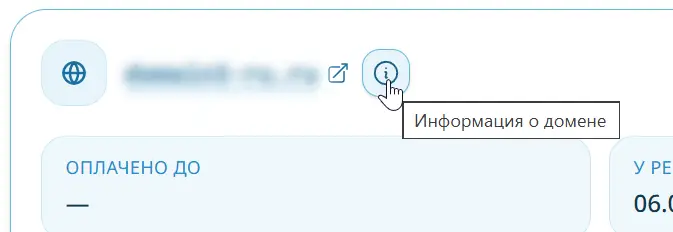
- 2 On the required domain card, click the i icon next to the domain name. The tooltip and detailed information contain the domain details.
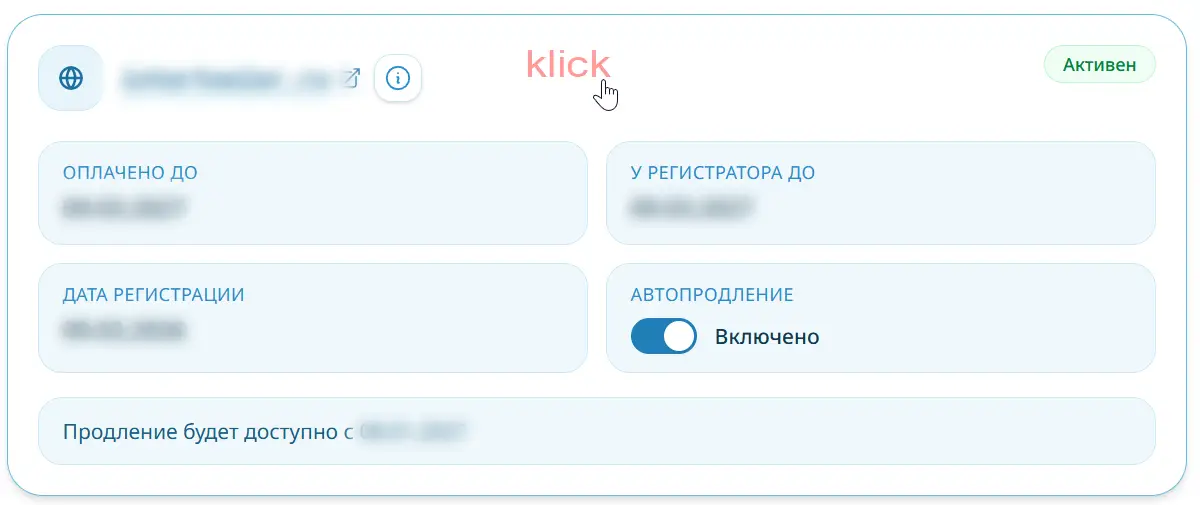
- 3 Click the domain card to open the detailed domain information page.
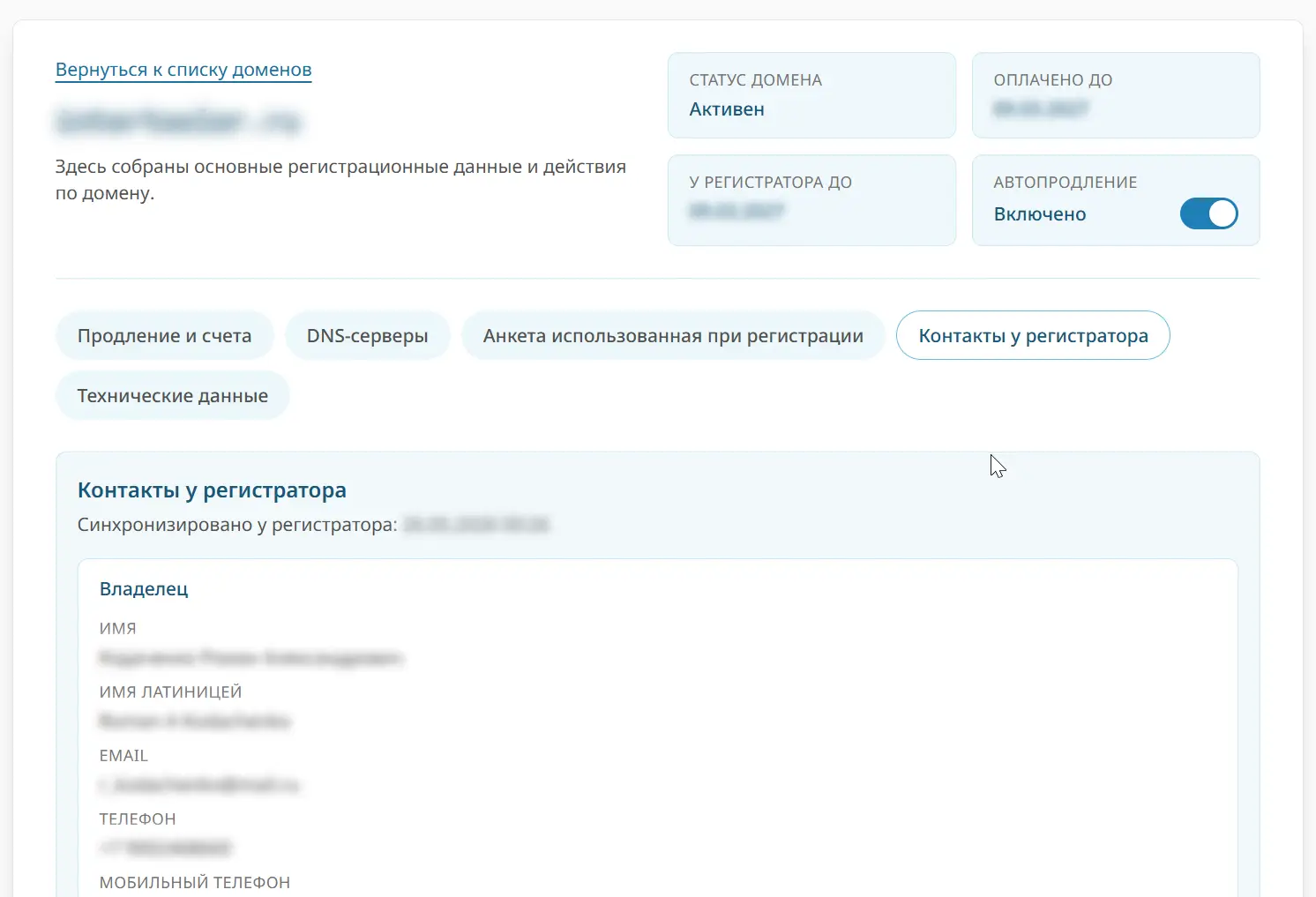
- 4 Open the “Registrar contacts” tab. There you can check the domain owner details.
The account check helps you understand the current domain status, but it does not change the administrator by itself. If the domain must legally pass to another person or organization, the registrar’s administrator change procedure is still required.
1. Information icon on the domain card
Click the “i” icon next to the domain name.
2. Detailed domain information page
Click the domain card to open the detailed domain information page. There you can check the domain administrator.
3. Registrar contacts
On the detailed domain information page, you can see the contacts listed with the registrar. These details must be verified before the rights transfer is prepared.
Check the current administrator
First, determine who the domain is currently registered to: an individual, sole proprietor, Russian company, or foreign organization.
Verify the details
If the current administrator is not verified, they must complete verification in Webnames or email support@webnames.ru from the administrator’s contact email address.
How to verify the detailsPrepare the new administrator
The new administrator registers at Webnames.ru, fills in the profile, and verifies their details.
What is required for verificationPrepare the statement
The current administrator prepares a written statement transferring rights to the new administrator using the Webnames form.
Send the statement to the registrar
The statement is submitted using a method suitable for the administrator type: electronic document exchange, qualified electronic signature, original by post, courier, or office visit.
Check the website and email
After the transfer, DNS, NS, MX, TXT, SSL, and hosting should be checked separately to ensure the website and email continue to work.
How it works through Webnames
Siteko is a Webnames partner, so a domain can be registered through the Siteko interface, but the legal transfer of domain rights is carried out according to the registrar’s and domain zone’s rules.
According to the Webnames instructions, the new administrator must register at Webnames.ru and verify their details . The current administrator provides a statement transferring domain rights to the new administrator — this is how the domain is reissued with the registrar.
- the new administrator registers and verifies their details ;
- the current administrator prepares a rights transfer statement using the Webnames form;
- the original or electronic version of the statement is submitted using a method allowed by the submission rules.
Where to look on the registrar’s website
Domain administrator change
A short Webnames guide: the new administrator registers and verifies their details, while the current administrator sends a statement.
Registrar / administrator change
A general page with preliminary verification, restrictions for .RU, .РФ, and .SU, and links to the required letters.
Administrator change wizard
The Webnames page for starting the procedure in the account, if the domain is available there.
Statement submission rules
How to submit original statements: electronic document exchange, qualified electronic signature, post, courier service, or office visit.
Required check
The current administrator must be verified
Before transferring the domain, make sure the current administrator’s details are verified. If they are not verified, the procedure may stop before the rights transfer can even be prepared.
If there is no access to the Webnames account, the request can be sent to support@webnames.ru from the contact email address, specifying the domain and attaching identity verification documents.
If the administrator is not verified
Email Webnames from the current administrator’s contact email address.
Specify the domain, the Webnames login if known, and the reason for the request.
Attach clear, readable color documents for data verification.
Example email subject
Verification of domain administrator details before administrator change
In the email, specify the domain, the current administrator, the Webnames.ru login if known, and ask for the data verification procedure required for the subsequent domain transfer.
Important: domain administrator identification
Before rights are transferred, the registrar may require the current administrator’s details to be verified. Without verified details, changing the administrator may be impossible. Identification through Gosuslugi and ESIA is better covered separately because the requirements change.
Domain administrator identification through GosuslugiDocuments
What to prepare for administrator identification
The exact document set depends on the situation, but these groups are a useful starting point for preparation.
Individual
- color scans or photos of passport pages showing full name;
- pages showing date of birth;
- pages showing the date and place of issue;
- pages showing residential address;
- if the full name changed — a document confirming the name change;
- if the passport or citizenship changed — documents confirming the current details.
Russian legal entity
- a clear, readable color copy of the OGRN certificate;
- a clear, readable color copy of the INN certificate;
- if the director changed — an EGRUL record sheet confirming the director change;
- if a representative applies — a power of attorney or machine-readable power of attorney details;
- if company details changed — documents confirming the changes.
Foreign legal entity
- documents confirming the company’s state registration;
- documents must be in color and clearly readable;
- if the documents are not in Russian, the registrar may request a translation;
- it is better to confirm the exact document set with Webnames in advance.
Documents contain personal data. Before sending them, make sure you are contacting the Webnames / Regtime registrar through the official support address or the form in your account.
How to prepare the statement
After the details are verified the current administrator prepares a statement transferring the administration rights. Webnames separately warns that scanned copies or photos of statements are not accepted.
Legal entities may use electronic document exchange, the original by Russian Post or courier, qualified electronic signature with electronic submission, or office submission. Individuals and sole proprietors may use a qualified electronic signature, send the original by post or courier, or submit it in person; sole proprietors may also use electronic document exchange.
What to save before the transfer
Changing the administrator alone should not move the website or change email. But if hosting, NS servers, or DNS records are changed at the same time, interruptions are possible.
Common situations
When an administrator change is required
If the domain needs to be legally transferred to another person or organization, focus on the administrator change procedure, not on website transfer.
The domain was registered by a developer
If the domain needs to be transferred to the client, giving access to the website or hosting is not enough. The domain administrator must be checked and the rights transfer must be completed.
The domain needs to be transferred to a company
If the domain is registered to an individual but should belong to an organization, the administration rights must be transferred from the individual to the legal entity.
The domain is visible in the Siteko account
A domain being displayed in an account does not mean the owner has changed. Changing the owner requires a registrar procedure.
The website must keep working
Before the procedure, save the DNS settings and understand where the website, email, and SSL are hosted.
Siteko help
If the domain was registered through Siteko
We can help determine which procedure applies to your situation: administrator change, registrar transfer, website transfer, DNS setup, or moving the domain between accounts.
It is important to understand that if the goal is to change the domain administrator, the registrar’s administration rights transfer procedure is required. A simple move inside hosting is not enough.
What we can help with
- who the current domain administrator is;
- which DNS records should be preserved;
- why moving to another account does not change the owner;
What is better to avoid
- do not change NS and hosting at the same time without a plan;
- do not send documents through unofficial channels;
- do not treat giving access as a legal domain transfer.
FAQ
Frequently asked questions about domain transfer
Does moving a domain to another account change the administrator?
No. Moving a domain between accounts or inside hosting does not by itself change the administrator in the registry.
How do I change a domain administrator?
Check the current administrator, make sure their details are verified, prepare the new administrator, and submit a rights transfer statement to the registrar.
How do I change a domain owner?
In registrar rules, this is usually called changing the domain administrator. If another owner is needed, the domain administration rights are transferred to the new person or organization.
How do I reissue a domain to another person?
In everyday language this is domain reissue; with the registrar it is an administrator change or administration rights transfer. The new administrator registers with the registrar, while the current administrator verifies details and submits a statement.
Can a domain be reissued to a legal entity?
Yes, if the domain zone and registrar rules allow it. Usually, the organization’s details and documents must be prepared, and the current administrator must submit the rights transfer.
What is a domain rights transfer?
It is the legal transfer of domain name administration rights from the current administrator to a new one. It changes the owner in registrar records, not just access to the website or hosting.
Is a domain rights transfer agreement required?
The registrar procedure usually uses a statement or rights transfer form. A separate agreement between the parties may be needed for your internal legal relationship, but the registrar accepts documents according to its own rules.
Are the domain owner and domain administrator the same thing?
In everyday language people usually say “domain owner”, but Russian domain zone rules use the term “domain administrator”. Changing that administrator is what transfers the domain to another owner.
Who is a domain administrator?
This is the person or organization in whose name the domain is registered in the registry. They hold the rights and obligations related to the domain.
Does the new administrator need to register with Webnames?
Yes. According to Webnames instructions, the new administrator must register and verify their details before receiving rights to the domain. View the verification procedure .
What should I do if the current administrator is not verified?
First, verify the details. You can fill in the main Webnames profile or email support@webnames.ru from the administrator’s contact email address, specifying the domain and attaching documents. Go to the instructions .
Can the administrator and registrar be changed at the same time?
These actions are better handled separately. Webnames describes separate restrictions and procedures for administrator changes and registrar changes.
Does changing the administrator change DNS?
Changing the administrator alone should not change DNS, but risks arise if NS servers, hosting, or email records are changed at the same time.
Is an AuthInfo code needed to change the administrator?
An AuthInfo code is usually needed to transfer a domain to another registrar. Changing the administrator is a different procedure: it transfers rights to the domain to a new administrator.
We’ll help you handle the domain without unnecessary steps
If the domain, website, DNS, and email are connected, it is better to first determine the correct order of actions. Siteko will help identify what you actually need: administrator change, website transfer, DNS setup, or a future transfer of the domain under Siteko management.